How To Actually Read Your Amazon SQP Report Without Drowning
Read more
.png)
A weekly SQP review routine is a fixed 30-minute cadence for reading your Search Query Performance report and turning each funnel signal into a PPC action.
Summarize in ChatGPT

The value of the Search Query Performance report is not in reading it once. It is in reviewing it on a fixed weekly rhythm and acting on what changed.
A weekly SQP review routine is a fixed, repeatable process for reading the Search Query Performance report and converting each signal into an action, run on the same day every week.
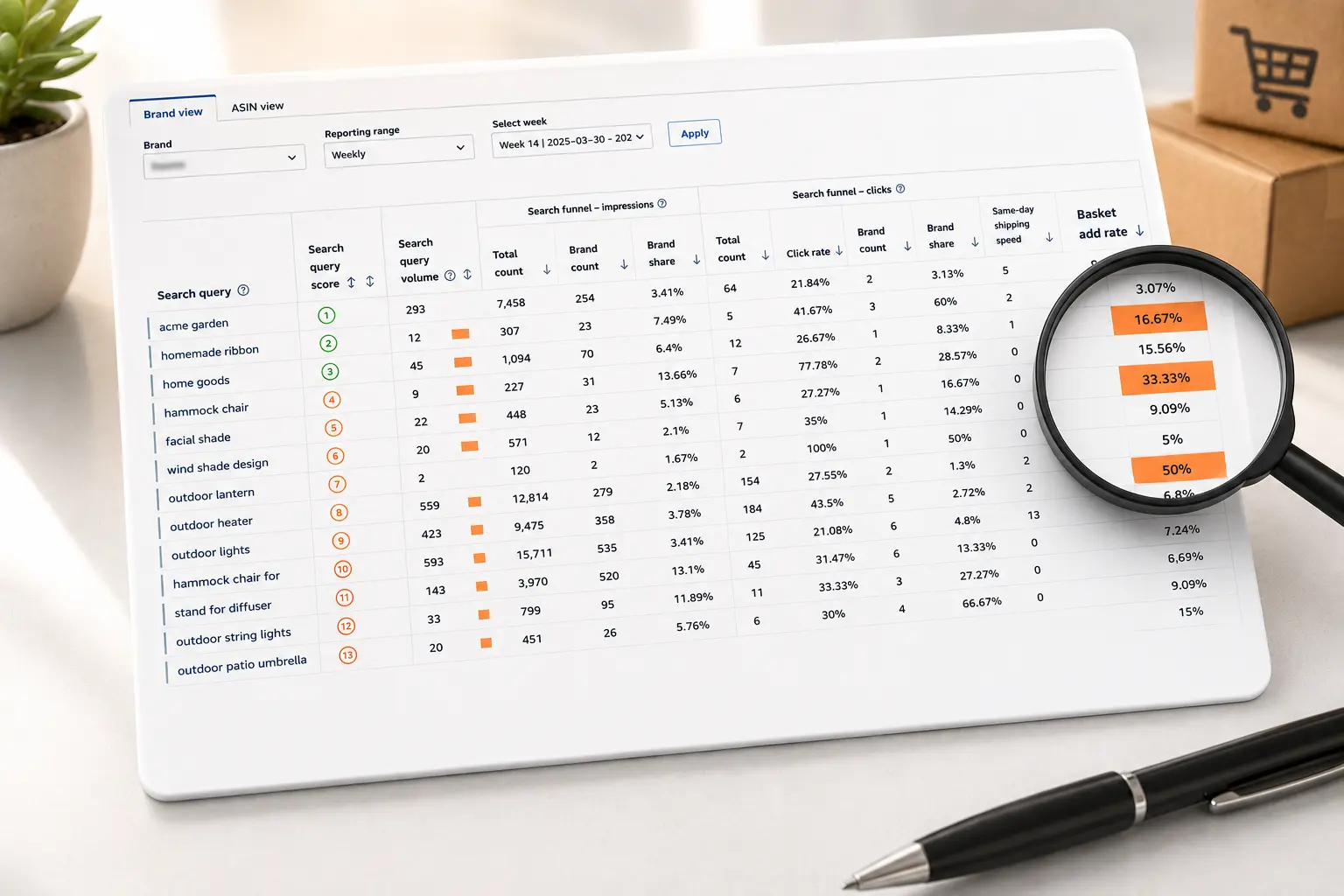
SQP lives inside Amazon Brand Analytics, the Seller Central toolset available at no charge to sellers enrolled in Amazon Brand Registry, and it shows the real customer search terms that lead to your brand along with impressions, clicks, cart adds, and purchases.
The routine matters because the report is dense. Without a fixed process, an operator opens SQP, scrolls, feels informed, and closes it without changing anything. A routine replaces that drift with a short checklist that always ends in decisions.
Before you run it, you need to be comfortable reading the columns, so if the report is still new to you, start with how to read the Amazon SQP report and come back to the routine once the layout is familiar.
Amazon built this data for exactly this use. When it launched the search analytics dashboard, the stated purpose was to help sellers optimize listings, plan inventory, and grow the business using anonymized query and conversion data. The routine below is how an operator turns that intent into a habit.
A weekly cadence catches problems while they are still small. A query that starts losing purchase share this week is a minor fix now and a lost keyword by month end. Reviewing monthly means you find the slip four weeks late, after the ranking and the momentum are already gone.
Weekly also keeps the review honest by tying it to your live advertising. Most operators adjust PPC weekly, so pairing the SQP read with that same rhythm means the query data and the bid changes inform each other in the same session.
You see a term gaining purchase share, you fund it that day, and you check the result the following week.
There is a discipline benefit too. A recurring 30 minute block on the calendar turns analysis into a habit instead of a task that slips whenever the week gets busy. The operators who compound gains are not the ones who study the report hardest once. They are the ones who look at it every week and make one or two good moves each time.
The weekly window also matches how quickly shopping behavior shifts. Demand for a query can move with a promotion, a competitor launch, or a seasonal swing inside a single week, and a monthly view blends all of that into one flat average that hides the story.
A weekly read keeps each change visible while you can still tell what caused it, which is what makes the follow-up action precise instead of a guess.
The whole routine should fit in 30 to 45 minutes once you know the report. The point is a fixed sequence you repeat, so nothing important gets skipped when the week is busy.
Work top down, because your highest-volume queries move the most revenue and deserve your freshest attention. A common mistake is starting alphabetically or wherever the cursor lands, which spends your best focus on low-volume terms.
Always compare against the prior week, not just today's snapshot. The routine is built on change, so the number that matters is the direction a query moved, not its level in isolation.
Setting the same comparison window every week is what lets you read a three point drop in purchase share as the early warning it is, rather than noise you scroll past on the way to something louder.
The output of the routine is the log, not the reading. By the end you should have a short list of queries, each with one decision attached and a date to check it.
That log is what makes next week's review fast, because you start by confirming whether last week's moves worked before you look at anything new.
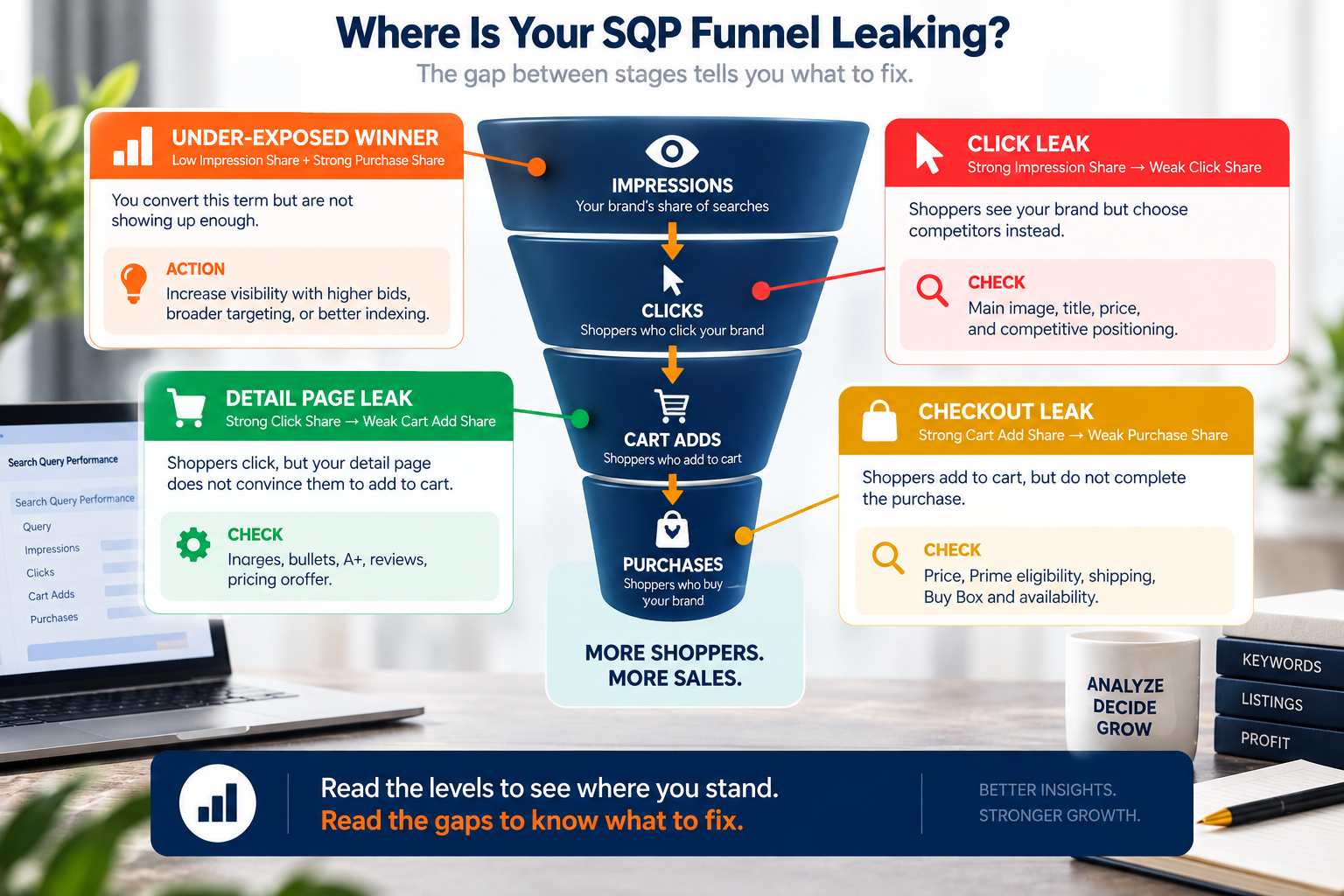
The heart of the routine is reading your brand's share as the shopper moves down the funnel. Each stage has a distinct meaning, and the gap between two stages is where the action hides. The table pairs each signal with the move it should trigger.
Read the levels to see where you stand. Read the gaps to know what to fix.
Impression share is where visibility lives. If a query shows you converting well but holding little impression share, you are leaving sales on the table, and it is the clearest buy signal in the whole report. If you are unsure what each column counts, keep the Search Query Performance metrics definitions open while you read.
Click share is the stage operators skip most often, and it is where a strong product quietly loses to a weak thumbnail. If you own the impressions for a query but your click share trails your impression share, shoppers are seeing you and choosing someone else in the results, which points at your main image, your title, or your price rather than your detail page. That gap is often cheap to close and expensive to ignore.
The cart add to purchase gap deserves special attention because it is the most expensive place to leak. A shopper who added your product and did not buy was one step from converting, and the cause is usually price, shipping, or a buy box issue rather than anything about the ad.
When you see this pattern repeat across queries, work through the cart add to purchase drop-off before you touch bids. More traffic will not fix a checkout problem.
Read the direction, not just the level. A query where your share is falling week over week matters more than one that is simply low and stable, and watching those click and price trends in the SQP report tells you which terms are slipping while there is still time to defend them.
A review that ends in notes is wasted. Each flagged query should convert into a concrete advertising change in the same session, and a short set of moves covers almost every case.
When a query shows high purchase share but low impression share, you convert it and simply do not show enough, so raise bids to claim more of those impressions. Amazon's dynamic bidding, up and down can lift your bid by up to 100% on the placements most likely to convert, which suits a term you already know performs.
The customer phrases in SQP are real demand, and the ones converting for your brand belong in your campaigns as their own keywords. Amazon's keyword strategy guidance describes this harvesting loop of reading what converted and promoting the winners, and SQP is a richer source for it than the search term report alone.
When a query pulls clicks but almost no purchases for you, and it does not fit your product, make it a negative so it stops draining budget.
For the terms you keep, moving proven phrases toward exact match, as Amazon's keyword targeting guide lays out, gives you the control to bid each one at its true value.
SQP shows the whole market's funnel for a query, while your advertising report shows what your own campaigns did, and reading them together prevents a wrong call. Understanding how SQP differs from the search term report is what keeps you from cutting a term that converts organically just because it looks quiet in ads.
If your brand name shows very high impression and purchase share, you may be paying for clicks you would win organically anyway, and that is a classic leak. A weekly look at branded traffic cannibalization in SQP tells you whether your branded spend is defending shelf space or just taxing sales you already own.
A routine only compounds if it survives a busy week, so build it to run the same way every time. Put a recurring block on one person's calendar, ideally the same day you make PPC changes, and give that person clear ownership of the log.
Shared ownership tends to mean no ownership, and the review quietly stops happening.
Keep the log simple enough that you actually maintain it. A single sheet with the query, the signal you saw, the action you took, and the date to check it is enough. The discipline is not in the tooling. It is in always writing down the decision and always checking it the following week, so the routine builds a record of what works for your catalog.
Protect the block like a meeting you cannot move. The review fails not because operators forget how to read the report but because the half hour gets eaten by whatever felt more urgent that day. Treating the slot as fixed, and running it at the same time each week, is the single habit that separates the accounts that improve from the ones that only mean to.
Standardize the first five minutes so you never stall on setup. Same report view, same sort, same top queries first. When the opening moves are automatic, the whole review gets faster and your attention goes to the decisions instead of the mechanics.
Operators who want the routine run for them, with the analysis and the PPC changes handled together, can hand it to a dedicated PPC management service rather than owning the weekly block themselves.
The report is interesting enough that it is easy to browse, feel productive, and change nothing. Force every review to end in a written action, even if that action is to hold and recheck next week.
It feels thorough to optimize a term with a handful of searches, but the revenue is in the head and shoulder of your query list. Work top down, and stop when the volume gets thin.
When purchase share is weak, buying more impressions pours money into a listing that does not close, which raises spend and lowers efficiency at the same time. Fix the page or the price first, then scale the traffic.
Operators focus on discovery and forget to check whether their branded spend is defending real threats or just paying for organic wins. A weekly glance at branded share keeps that leak closed./
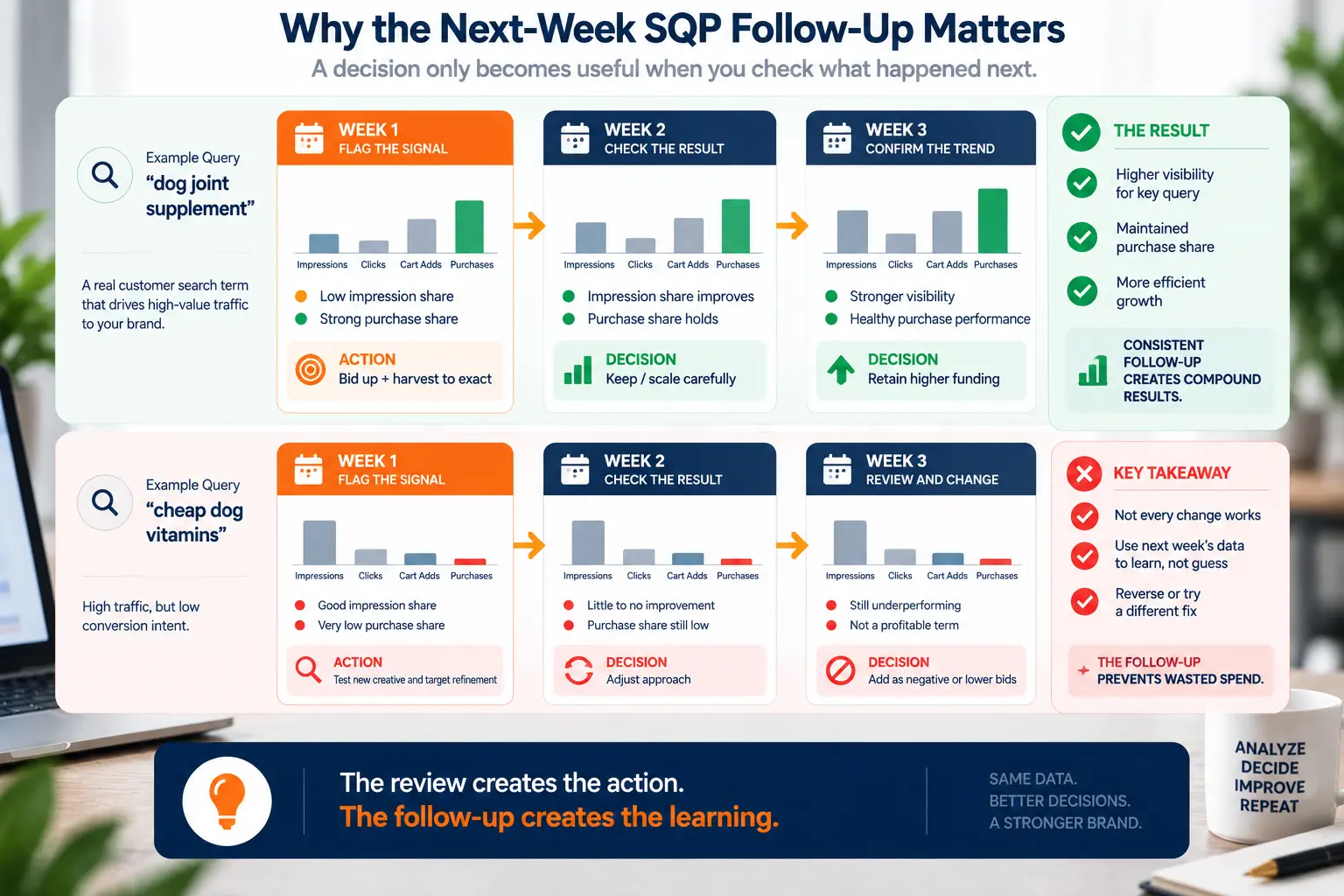
The review is only half the loop, and the value shows up when you confirm last week's changes moved the number. If you never check, you never learn which moves work, and a quick PPC audit can reset the routine when the follow-up has slipped for a while.
A weekly SQP review is not complicated, but it is easy to skip, and the operators who keep it compound small gains into a real advantage. The report gives you the whole funnel for the queries that matter, and the routine turns that view into one or two good decisions a week.
Set the block, keep the log, and always end in an action. If you would rather have the review and the resulting PPC work handled for you, book an Amazon strategy session and a strategist will run the routine on your account.
You can also explore the category playbooks at Amplivus to see the weekly routine applied in your specific niche.

Build a repeatable SQP review that catches lost share, surfaces keyword opportunities, and turns weekly search data into smarter PPC decisions.
See where impressions, clicks, cart adds, or purchases drop and turn each SQP signal into a focused weekly PPC action.