What Is Amazon PPC and How Does It Work
Read more
.png)
Amazon Sponsored Ads are pay-per-click ads that place products and brands in Amazon search and product pages. Start with Sponsored Products, then expand.
Summarize in ChatGPT

A plain-English map of Amazon's three self-service ad types: what each does, what it costs in 2026, whether you qualify, and which to switch on first.
If you sell on Amazon, you have already met these ads as a shopper. You search for a coffee grinder, and the first few results carry a small "Sponsored" tag. Someone paid to sit there.
The moment you start selling, the question flips around: now you are the one deciding whether to pay for that spot, how much, and whether it will ever pay you back.
That shift trips up a lot of new sellers. The Amazon Ads console throws a wall of formats, bids, and acronyms at you on day one, and most guides answer your real questions with "it depends."
This guide does the opposite. By the end you will know what each ad type does, what it costs, whether you qualify, and which to switch on first. If you want the wider fundamentals first, our primer on what Amazon PPC is and how it works covers them; this guide goes deep on the ad types.
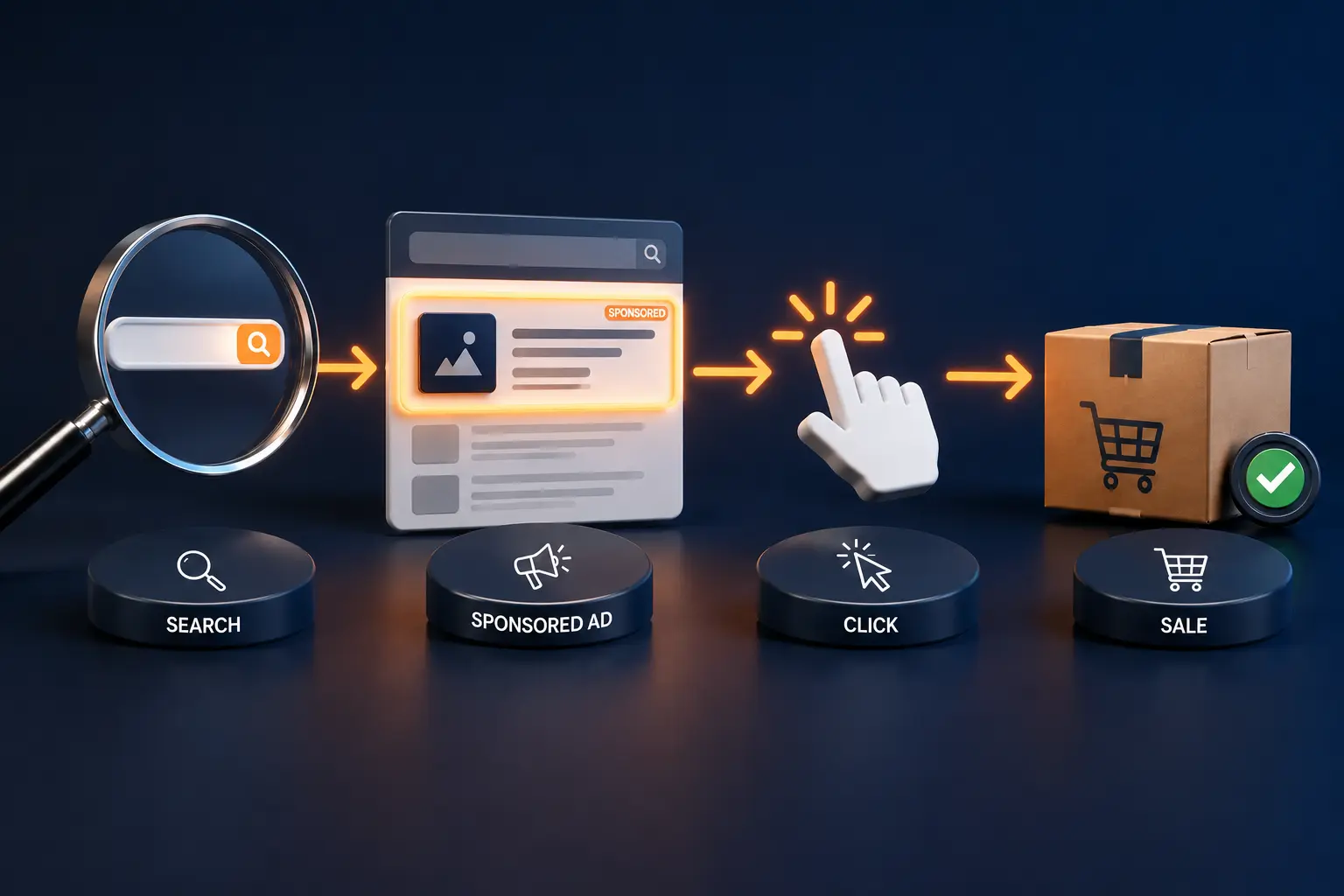
Amazon Sponsored Ads are pay-per-click (PPC) ads that let sellers and brands pay to appear in Amazon search results and on product pages, charged only when a shopper clicks.
There are three self-service types: Sponsored Products, Sponsored Brands, and Sponsored Display. Together they sit inside Amazon Ads, and you run them from Seller Central or the Amazon Ads Console.
That is the whole idea in one breath: you bid for visibility, a shopper clicks, you get charged, and if they buy, the ad paid off.
The pay-per-click model is the same one that powers most online search advertising. What makes Amazon different is that the shopper is already standing in the store with a card in hand, which is why these ads tend to convert better than ads on platforms built for browsing.
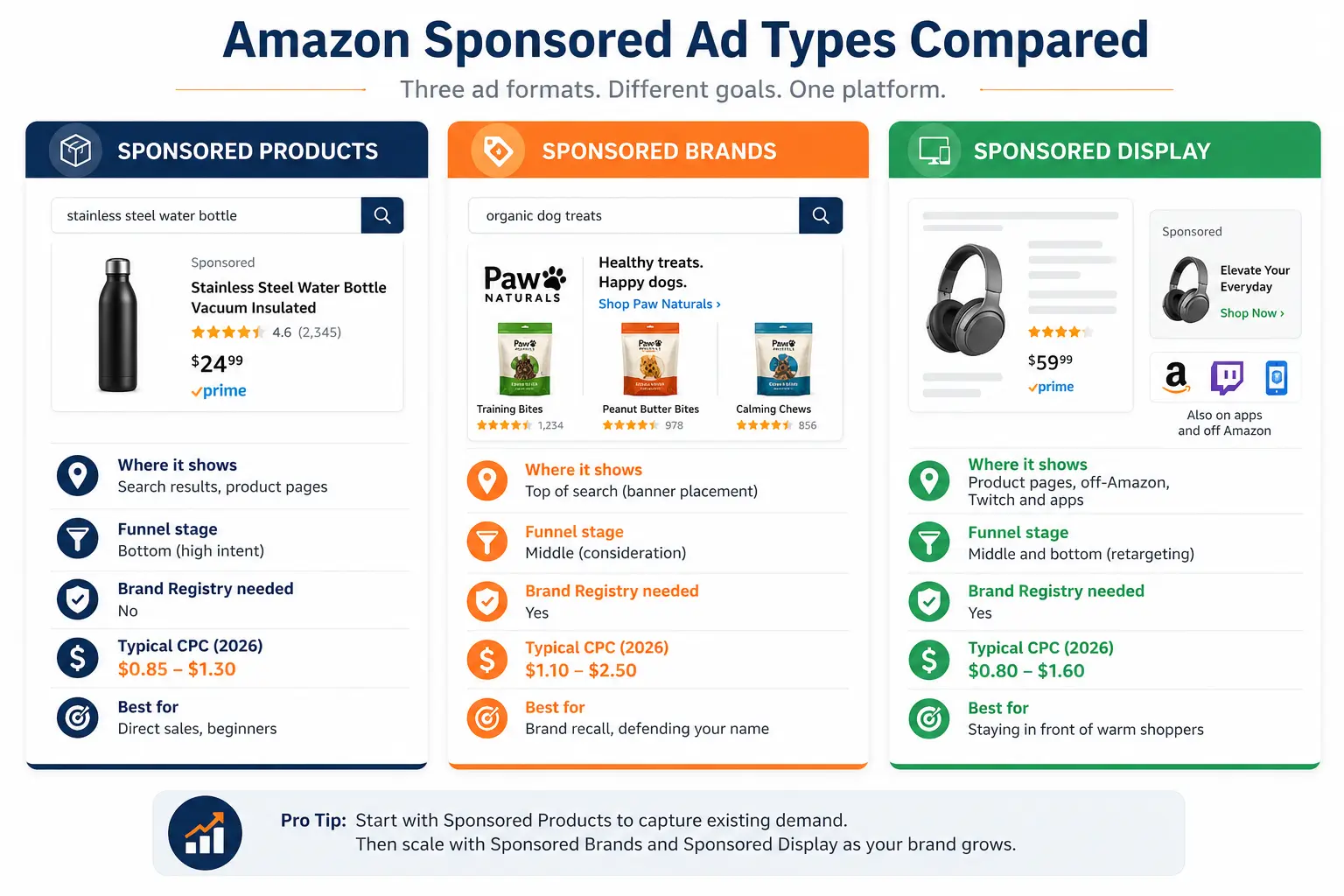
Before we go deep, here is the whole board in one view.
Keep this table in mind as you read. Most sellers start in the left column and earn their way rightward.
If you only ever run one ad type, this is it. Sponsored Products promote a single listing inside search results and on competitor product pages, in the exact spots where a buyer is closest to clicking "add to cart."
This is why they tend to eat the majority of a seller's budget: mid-size brands often route well over half their spend into Sponsored Products management, because it captures demand that already exists.
You target in two ways. Keyword targeting puts your product against the words people type, like "stainless steel water bottle." Product targeting puts your ad on specific listings or categories, so your bottle shows up on a rival bottle's page.
Inside keyword targeting you choose match types (broad, phrase, exact) that control how loosely Amazon matches your keyword to a real search.
You also layer in negative keywords, which tell Amazon which searches to skip so you stop paying for clicks that never convert.
Sponsored Products gives you four bid strategies: Dynamic up and down, Dynamic down only, Fixed, and Rule-Based Bidding. You can let Amazon raise bids when a click looks likely to convert, or hold them steady while you learn.
For most new sellers, this is where the first dollar should go, and the ACoS section below shows how to read the numbers.
Sponsored Brands are the banner-style ads across the very top of search results, usually showing your logo, a custom headline, and a few products. Instead of selling one item, they sell the brand.
A shopper searching "organic dog treats" sees your name and three of your bags first, which plants brand recall even if they do not click that second.
This format has grown past static banners. Sponsored Brands Video lets a short clip autoplay in the results, one of the highest-attention placements on the platform.
You can also send clicks to your Amazon Store rather than a single listing, so shoppers land on a branded page that feels like a mini website.
In 2026, Amazon expanded product collections to three to ten products per ad, letting Amazon feature the ones that best match the shopper.
The catch: Sponsored Brands require Amazon Brand Registry, which means a registered trademark. If you have it, Sponsored Brands management protects your brand name from competitors bidding on it and builds the recognition that makes every other ad work harder.
That defensive role matters more than sellers expect, as our guide to branded traffic cannibalization in SQP shows.
Sponsored Display keeps you in view after the shopper leaves the search bar. It does not rely on keywords. Instead it uses audiences and shopping behavior to place your ad on product pages, on the Amazon home feed, and on sites and apps beyond Amazon.
Its signature move is retargeting: someone viewed your product, did not buy, and now your ad follows them back.
You can also target audiences by interest or by the products they browse, which lets you appear on a competitor's detail page or in front of shoppers who viewed similar items.
For a small brand, the smart use is narrow and patient: retarget people who already touched your listings, since they are the cheapest to convert. Like Sponsored Brands, Sponsored Display needs Brand Registry.
The three formats above are self-service. Above them sits Amazon DSP (Demand-Side Platform), the programmatic engine that buys display and video across Amazon's full inventory and partner sites, where larger brands run awareness at scale.
Sitting alongside it now is Sponsored TV, Amazon's self-serve streaming format that places video on Prime Video, Twitch, and connected-TV inventory without the old DSP minimums, with Amazon Marketing Cloud (AMC) tying a streaming view to a later search and purchase.
You do not need any of this on day one. File it under "where you grow next," a path our guide on how to scale Amazon PPC past $100K a month covers in full.
Amazon's ad business has become one of the largest in the world, a scale visible in Statista's reporting on Amazon advertising revenue.
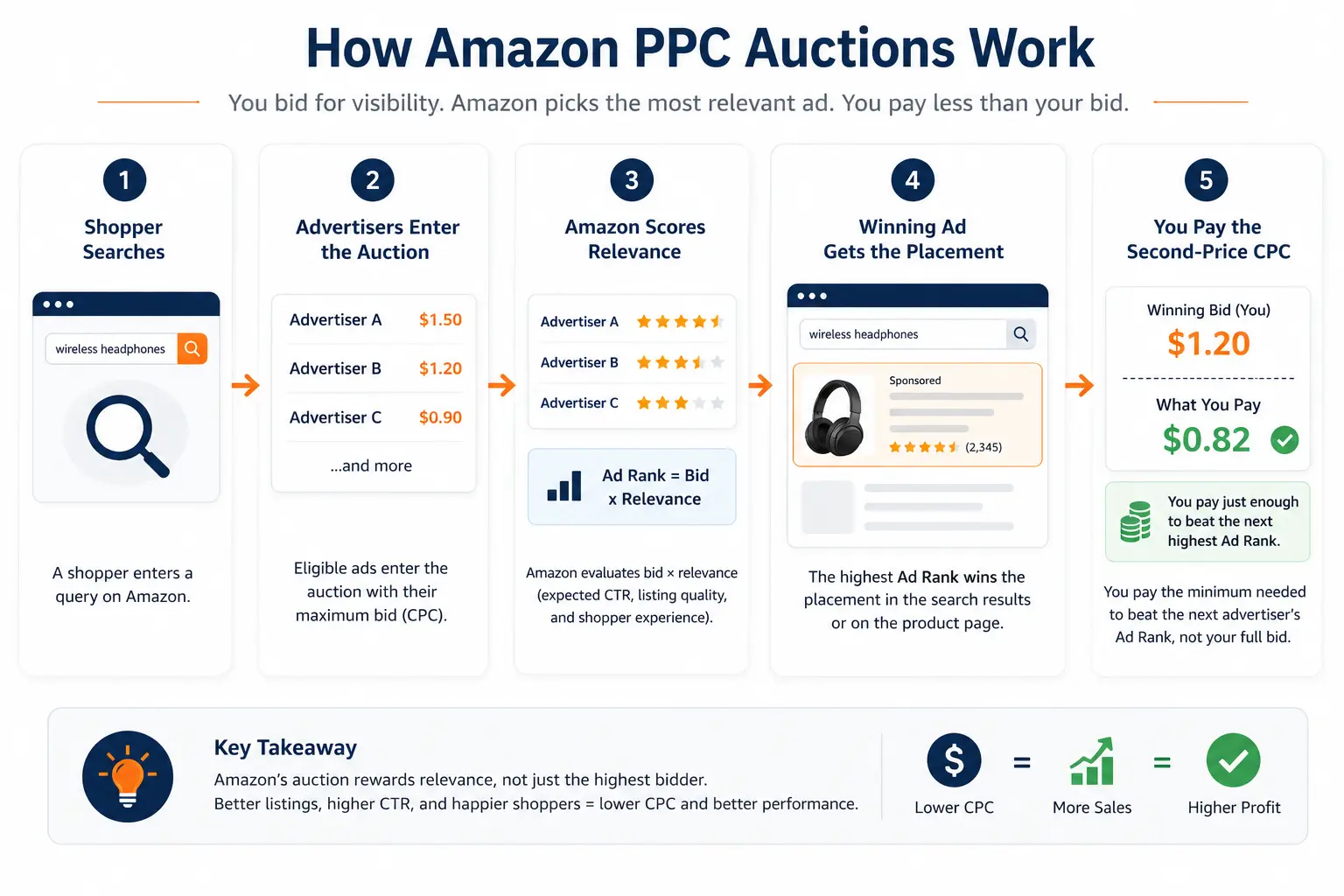
This is the part almost every guide skips, and it saves you money once you get it. Amazon decides which ad shows, and in what order, through an auction that runs in milliseconds every time someone searches.
Two things matter: your bid and your relevance.
Relevance is Amazon's read on how likely your ad is to earn a click and a sale, drawn from your click-through rate, conversion rate, listing match, and recent sales velocity.
A well-converting listing with a lower bid can beat a poorly converting one with a higher bid, because Amazon would rather show the ad that makes everyone money.
Now the part that surprises people. Amazon runs a second-price auction, so you do not pay your full bid. You pay one cent more than the next-highest competitor: bid $2.00 when the runner-up bid $1.50, and you pay about $1.51.
This is why your reported cost-per-click is almost always lower than the bid you set, and why bidding a sensible ceiling rather than a timid one often wins the placement without overpaying.
Here is the number you came for, stated plainly. The average cost-per-click on Amazon in 2026 sits around $1.18, with most clicks between $1.00 and $1.25, up roughly 8 to 12 percent from the year before as more sellers compete for the same spots.
By ad type, Sponsored Products clicks run about $0.85 to $1.30, Sponsored Brands $1.10 to $2.50, and Sponsored Display $0.80 to $1.60. By category the spread is wider still.
Low-competition niches like books can sit near $0.45 to $1.00, while crowded categories like beauty and supplements push past $2.00, and the most cutthroat keywords top $6.00. There is no single "Amazon ad cost," only a range your category and bid decide.
A realistic starting point for a new seller is $20 to $50 a day on Sponsored Products, enough to gather data within a week or two.
The goal early on is not profit. It is learning which keywords convert so you can cut the losers and feed the winners.
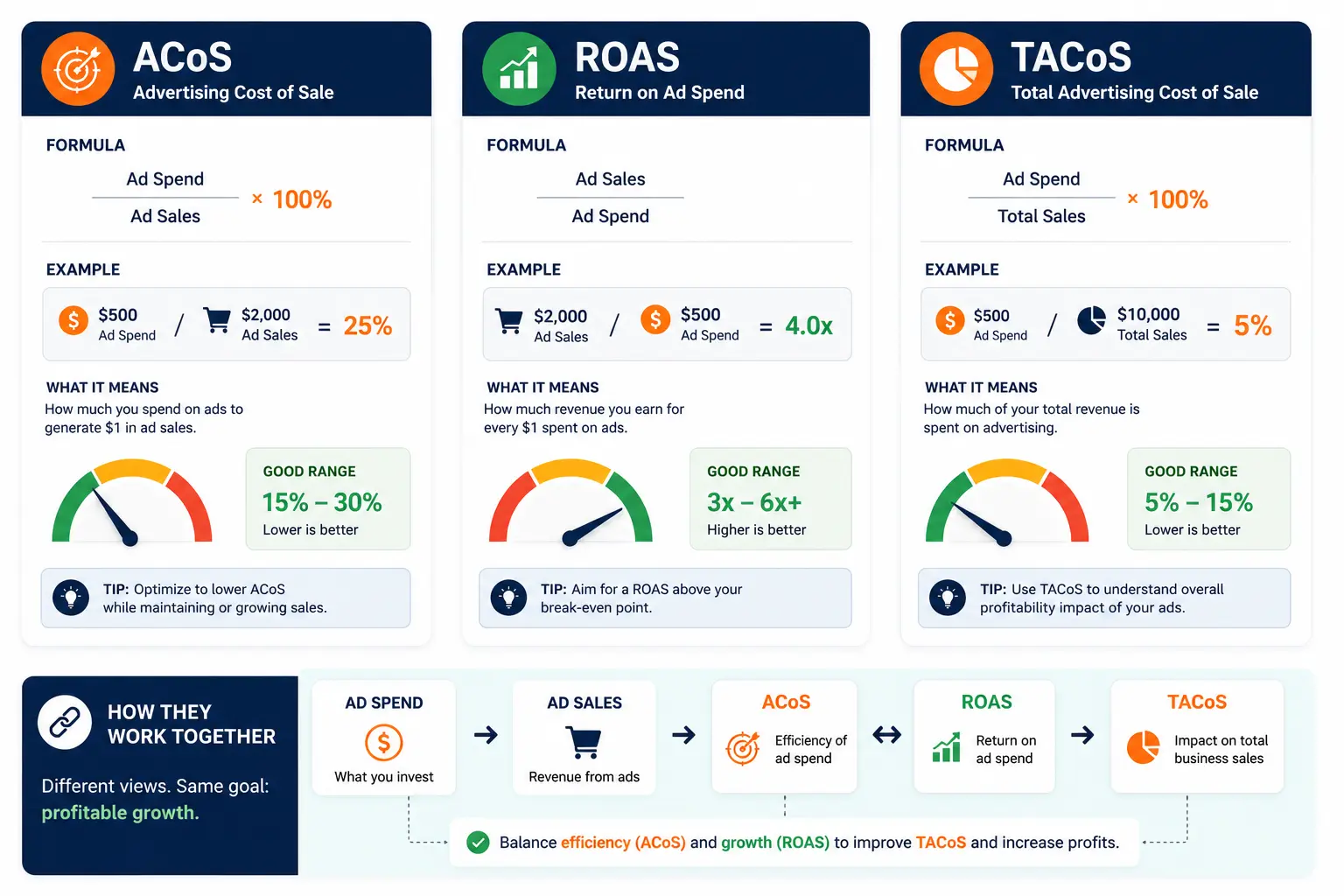
Three acronyms run the whole scoreboard. Advertising Cost of Sale (ACoS) is ad spend divided by ad sales, as a percentage: spend $20 to make $50 and your ACoS is 40 percent, and lower is more efficient.
Return on Ad Spend (ROAS) is the same relationship flipped, sales divided by spend, so that campaign is a 2.5x ROAS. Total ACoS (TACoS) widens the lens to ad spend against total sales, ads plus organic, which tells you whether advertising is lifting the whole business or just shuffling sales around.
So what is a good ACoS? For most categories the average lands between 25 and 36 percent, and beginners are usually safe near 30 percent while they learn. But "good" depends on your margin.
A fat-margin product can tolerate a 40 percent ACoS and still profit, while a thin-margin product might need to stay under 20 percent. Know your margin first, then set your target.
To see which real search terms drive those sales, our walkthrough on how to read your Amazon SQP report shows where to look.
This is the question that quietly blocks half of new sellers, so let us settle it. You do not need Amazon Brand Registry to run Sponsored Products.
Any seller with a professional account and a listing that holds the Featured Offer (the Buy Box) can run them today, and that open door is the right one for beginners anyway.
You do need Brand Registry, which requires a registered trademark, to run Sponsored Brands and Sponsored Display.
If you sell your own brand and have not registered the trademark yet, start that in parallel, because those two formats open up real defensive and retargeting power once it clears.
If you resell other brands, Sponsored Products may be your lane for the long run, and that is perfectly fine.
Start with Sponsored Products. Every time. It is the simplest to set up, sits closest to the purchase, needs no Brand Registry, and produces the cleanest data on what your buyers search.
Run one automatic campaign so Amazon discovers converting terms, then a manual campaign on the winners it surfaces. That two-campaign structure is the most reliable on-ramp there is.
Once Sponsored Products is profitable and you are brand-registered, add Sponsored Brands to defend your name and build recall, then layer Sponsored Display to retarget the shoppers those campaigns warmed up.
Bottom of the funnel first, then upward, keeps you from spending on awareness before you can convert demand you already have. It is also how brand recall compounds into organic rank, the mechanic our guide on how Amazon PPC drives brand discoverability unpacks.
The costly beginner errors are predictable, and all five are avoidable.
You now have the full map: three ad types, what each costs, how the auction works, and a clear place to begin. Turn on a single Sponsored Products campaign, give it two weeks, and read the Search Term Report.
That one habit teaches more than any guide can.
When your campaigns outgrow manual tinkering, or the spreadsheets start eating your week, that is the moment to bring in help. As an Amazon PPC agency that works with sellers on exactly this, Amplivus can step in.
Request a free PPC audit of your account, or book a strategy session to map your next move.

Amplivus helps Amazon brands improve Sponsored Products, Sponsored Brands, and Sponsored Display performance without increasing ad spend.
Not sure which keywords, bids, or ad types are draining profit? Get a 24-hour Amazon PPC audit with clear actions.